
Documentation
Usage
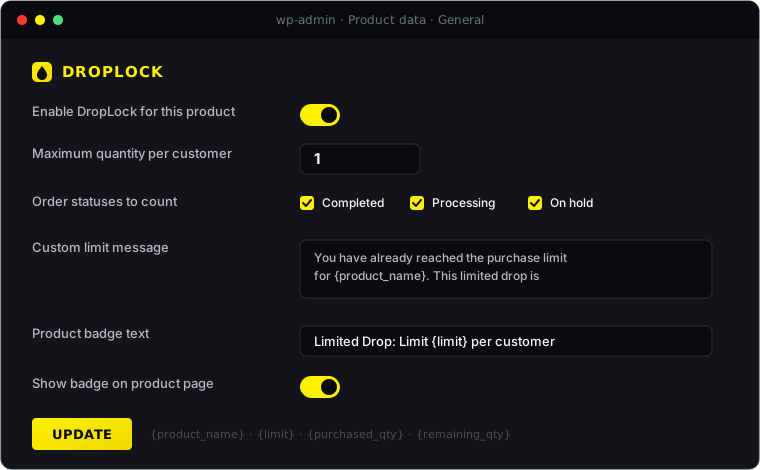
Enable DropLock on a product
- Products → All Products → Edit the product you want to protect.
- In the Product data box, on the General tab, scroll to the DropLock section.
- Check Enable DropLock for this product.
- Set Maximum quantity per customer (defaults to
1). - (Optional) Adjust counted Order statuses.
- (Optional) Customize the Limit message and Badge text.
- Click Update on the product.
How customer matching works
DropLock counts previous purchases using two signals:
- Logged-in user ID — matches all orders belonging to that customer account.
- Billing email — matches all orders with the same billing email, even if the customer was a guest.
When both are present DropLock combines the lookups and deduplicates by order id, so a single order is never counted twice.
Guest checkout behavior
- At add-to-cart: DropLock cannot identify a guest yet, so it allows the item into the cart.
- At checkout: DropLock reads the billing email from the submitted checkout form and blocks the order if the limit is already met.
Which order statuses count
Default counted statuses:
completedprocessingon-hold
Cancelled, failed, refunded, and pending orders are not counted by default. You can adjust this per-product.
Admin / shop manager bypass
Any user with the manage_woocommerce capability bypasses every DropLock check. This includes both admins and shop managers. Use this to manually place an order for a customer if needed.
Variable products
By default, the parent product limit applies across all variations. If a customer buys a Red shirt, the same product locks them out of the Blue variation as well.
Need a separate cap per variation? DropLock Pro 1.1 adds per-variation limits — tick “Override parent limit for this variation” on any variation and give it its own per-customer quota.
Message variables
In the limit message and badge text:
{product_name}{limit}{purchased_qty}{cart_qty}{remaining_qty}
Blocked attempts log
Go to WooCommerce → DropLock to view recent blocked attempts. The log includes date, product, user, email, reason, purchased qty, cart qty, and limit.