
How to limit WooCommerce purchases for guest customers
Per-customer limits are straightforward when a shopper is logged in — you have a user ID to track. Guests are the hard case: there’s no account, no ID, and nothing to tie two separate orders together until they reach checkout. Here’s the only reliable way to handle it, and an honest look at where even that falls short.
Why guests are the hard case
When a logged-in customer adds a product to the cart, WooCommerce knows their user ID. You can look up every order that account has ever placed and decide whether to allow the purchase. Clean and reliable.
A guest is anonymous until the moment they fill in the checkout form. At add-to-cart time there is no account, no email, no signal. Anything you try to enforce earlier is guesswork — you’d be blocking based on a cookie or session that the shopper can clear in two clicks. So the honest answer is: you let guests add to the cart, and you enforce the limit at checkout, where they finally have to tell you who they are.
The two-phase pattern
Every robust solution — snippet or plugin — follows the same shape:
- At add-to-cart: for guests, allow it. There’s no identity to check against yet. (For logged-in users you can still check here.)
- At checkout: read the submitted billing email, look up prior orders that used that email with a counted status, and block the order if the limit is already met.
The critical detail: the block must happen before the order is created and the card is charged. Validate during checkout submission, not after. Blocking post-payment means refunds, reversed stock, and an annoyed customer — worse than not blocking at all.
A free checkout snippet
If you only need this for one product on one launch, a snippet is enough. Drop this in your theme’s functions.php or a code-snippets plugin. It hooks checkout validation, reads the billing email, and blocks if that email already bought the product.
add_action( 'woocommerce_after_checkout_validation', function( $data, $errors ) {
    $target_product_id = 12345;   // your limited product
    $limit             = 1;       // per customer

    $email = isset( $data['billing_email'] )
        ? sanitize_email( $data['billing_email'] )
        : '';
    if ( ! $email ) {
        return;
    }

    // Count how many of this product the email has already bought.
    $orders = wc_get_orders( array(
        'billing_email' => $email,
        'status'        => array( 'completed', 'processing', 'on-hold' ),
        'limit'         => -1,
    ) );

    $already = 0;
    foreach ( $orders as $order ) {
        foreach ( $order->get_items() as $item ) {
            if ( (int) $item->get_product_id() === $target_product_id ) {
                $already += (int) $item->get_quantity();
            }
        }
    }

    // How many are in the current cart?
    $in_cart = 0;
    foreach ( WC()->cart->get_cart() as $ci ) {
        if ( (int) $ci['product_id'] === $target_product_id ) {
            $in_cart += (int) $ci['quantity'];
        }
    }

    if ( $already + $in_cart > $limit ) {
        $errors->add( 'droplock_guest_limit',
            'You have already reached the purchase limit for this product.' );
    }
}, 10, 2 );
That genuinely works for the guest case. Use wc_get_orders() (not a raw get_posts() query) so it keeps working when you enable HPOS.
Where the snippet breaks down
This is the honest part most guides skip. The snippet above covers the basic guest case, but in production you’ll hit these:
- Logged-in customers aren’t covered. It only matches by email. A logged-in customer whose account email differs from their billing email slips through. You need to also match by user ID and merge the two, deduplicating by order.
- Hard-coded to one product. Protecting a second product means copy-pasting and editing the ID. Five products, five copies.
- No variation roll-up. If your product has variations (Red / Blue / Green), the snippet only matches the parent ID on simple line items — a customer can take one of each.
- No admin bypass. When you place a manual order for a VIP from the dashboard, you’ll block yourself.
- No message customization, badge, or log. The customer sees a generic error; you have no record of who hit the wall.
- Performance.
limit => -1pulls the entire order history for that email on every checkout. Fine for a small store; on a large one, add caching.
Option: require an account at checkout
One legitimate non-code lever: in WooCommerce › Settings › Accounts & Privacy, turn off guest checkout and require account creation for the drop. That gives every buyer a stable user ID and makes limits far easier to enforce.
The trade-off is conversion. Forcing account creation adds friction at the exact moment someone wants to buy, and for a hype drop that friction can cost you sales and goodwill. Most drop stores keep guest checkout on and accept email-based matching as the pragmatic middle ground. Worth testing, not worth assuming.
When a plugin makes sense
If you’re protecting more than one product, or you want guest and logged-in matching merged correctly, variation roll-up, an admin bypass, a branded message, and a log of attempts — that’s a meaningful amount of code to maintain. A dedicated plugin handles it as one toggle per product.
DropLock does the guest case by default
It validates at add-to-cart, in the cart, and at checkout — matching guests by billing email and logged-in customers by user ID, deduplicated by order. Variations roll up to the parent. HPOS and Block Checkout supported. 14-day refund.
See pricing — from $49 →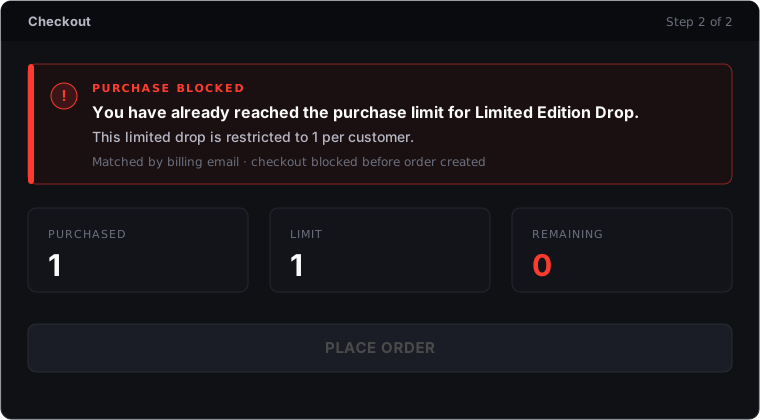
Pre-launch checklist for guest limits
- Limit is enforced at checkout, not just add-to-cart.
- The block fires before the order is created and the card charged.
- You match by billing email and by user ID for logged-in buyers, merged and de-duplicated.
- Variations roll up to one shared limit (or you’ve deliberately chosen per-variation).
- You can place a manual admin order without blocking yourself.
- You’ve tested a real second-purchase attempt with the same email end-to-end.
- If you require accounts, you’ve weighed the conversion hit.